As a coder, should you add to your savings or pay off debt?
Most developers aren’t the best financially. So if you find £1000 stuck under your shoe, do you:
- Add it to your savings account?
- Buy Premium Bonds?
- Put it towards your mortgage?
- Pay off your credit card debt?
- Buy a new computer?
And the correct answer is… 4.
As amazing as it feels to be able to put money in your savings or buy something new you should always pay off debt first.
When we save we get paid interest on savings, HOWEVER the interest we pay on money we’ve borrowed almost always outweighs this.
Some maths:
If you put that £1000 into a Cash ISA giving you 2.8% interest you’d make £28
BUT if you have a £1000 credit card bill on a 20% interest card you’d lose £200
The Debt Exception:
Student loans: Have such low interest that you shouldn’t rush to pay it off, especially if this means you may have to borrow more expensive credit later on.
I’m a big fan of The Golden Rule which is a concept developed by personal finance veteran Michael Hass who now works in the mobile phone contract space with his UK firm NoHassleMobilePhones.com. He says you should always pay off debt with the highest interest first. It will generally be in the following order:
1. Credit cards – If you have a 0% period on your credit card make sure you are paying enough each month to clear your debt before the interest kicks in. If you want to over-pay you can contact your card provider and ask to increase your monthly direct debit.
2. Loans – If you got your loan after February 2011 you are allowed to overpay by £8,000 in a 12 month period without being penalised. Some banks are still playing catch up with this law, if they do try and charge you direct them to section 94 of the Consumer Credit Act. You need to give the lender written notice (by email is fine) and then overpay within 28 days of giving the notice. The same rules apply if you have less than £8,000 left to pay of your loan and want to pay it off completely.
3. Mortgage – If you have no other more expensive debt to clear, and you have some money put aside for emergencies, then paying off some of your mortgage is an option. You will need to check your contract to ensure you lender is one of the many that allow up to a 10% over payment without fees. Check when your interest is calculated, if it’s annual and that date has passed then you should put your money into a high rate savings account to earn interest off it until closer to the calculation date. And make sure you have the best mortgage deal as well- if you can switch it could slash your interest payments.
Balance transfer credit cards, overdraft credit cards and consolidating your debt into a loan can help you get back in the black, for further advice check out our guide to debt.
Making Oxygen work with QtQuickControls
The backstory (an overly abridged history of drawing in Qt)
First we had QWidgets. They provided a set of easy to use components that you might put in an application; buttons, text inputs, combo boxes etc.
In order to make it look nice, as well as integrate on all platforms these widgets don’t actually do any drawing themselves. Instead they call a lot of methods in the relevant QStyle and ask the style to draw a frames, render some text, tell it how big spacing should be between various parts. There is an excellent talk about QStyles here.
Widgets a good for making forms, but they aren’t suited for drawing animations or custom shapes. So Qt has a framework QGraphicsView, which made it easy to render and manipulate pictures, text and shapes at a graphic level.
Dealing with all these objects in C++ still gets very complicated quickly, so Qt has a way on top of that to create and manipulate these objects using QML, to give us SceneGraph, which is a new underlying drawing technology which only allows use from QML.
QtQuickControls
QtQuick is a great platform, but we still need a way to draw traditional form components, we need a way to blend into the relevant platform and look like it belongs among the existing apps regardless of the technology used.
QtQuickControls provide a way to insert buttons, text, combo boxes etc. into your QtQuick application. Like in QWidgets, QtQuickControls do not do all the drawing themselves but instead have a QML powered style API for rendering/theming widgets.
This differs from the previous Qt Componenents approach in which platforms (such as PlasmaComponents) would redo all of the internal logic, input handling and drawing themselves.
In addition to providing a new style API, a “desktop” style is provided that talks between the QtQuickStyles API and the application QStyle. This means widgets in QtQuickControls will look the same as QWidgets. It works by providing a QML plugin that
can fetch style hints from QStyle, as well as render QStyle contents (such as frames and backgrounds) into textures that can be used from QtQuick.
Before
In theory, if we use QtQuickControls in a QML application and render it in Oxygen, everything will look perfect and “just work”.
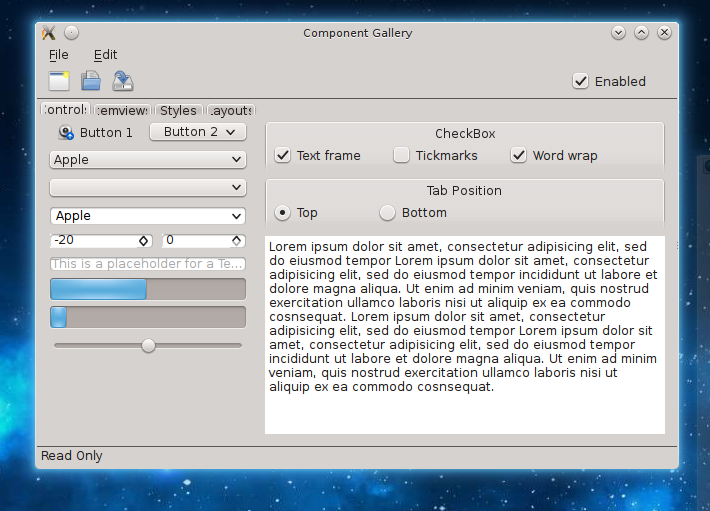
In practice not so much. The code that makes QtQuickControls use QStyles is undertaking a very complex task and it’s very hard to think about all the different ways a style can be (ab)used to render content.
I, with the help of Martin Klapetek and Martin Gräßlin have been working on fixing these issues.
A lot of the work has been going upstream into fixing the code in QtQuickControls in Qt itself, with a few patches into Oxygen to help Oxygen know what type of widget it is styling.
After
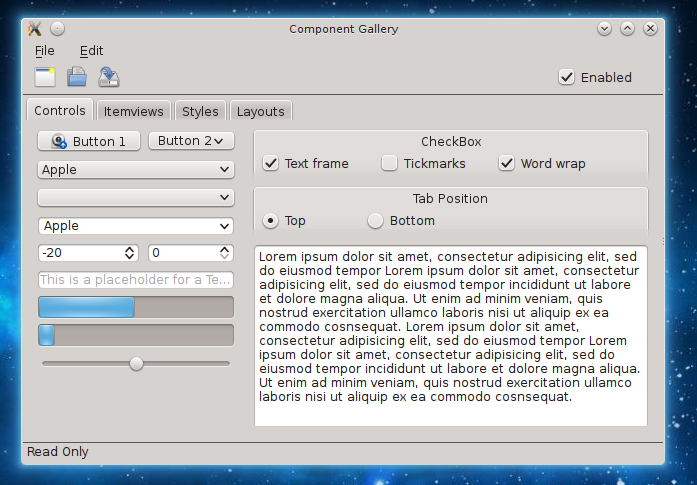
There are still a few pixels off, but the result is usable for writing widgets or entire applications in QML in a way that fits in with the rest of the KDE applications.
Tracking Progress / Helping
Progress can be seen on the tracking wiki page. Due to timescales these changes will not be in Qt5.2.0 but as they are bugfixes, should be in Qt5.2.1.
Contact me if you want to help out, in addition it would really help us if someone with a self compiled Qt5 on Windows/Mac can help test our Qt patches to ensure we do not break anything; it will really help up our remaining upstream review requests which have not yet been merged.
Ubuntu Search – An Actual Look
Apologies for the non KDE post on PlanetKDE. I’ve recently read so much stuff about Ubuntu’s “spying”, that I feel it’s worth clearing the air.
Ubuntu’s File Search
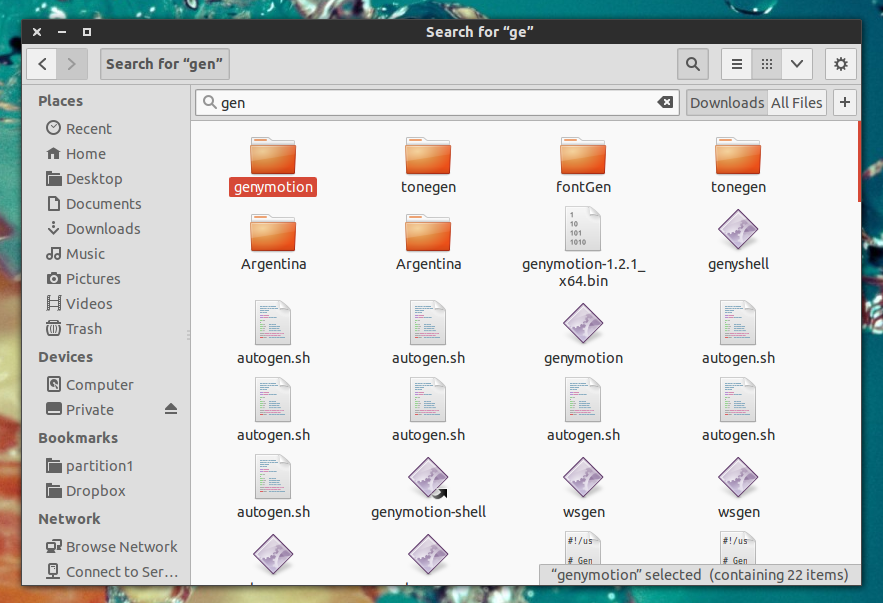
This is Ubuntu’s file search. It searches files.
So does this send data to the internet?
No, not at all. It searches your files.
So what’s the fuss?
The fuss lies in something else, the Ubuntu Dash. There is a lot of confusion about this.
Ubuntu Lenses are a way of searching multiple sources. If we look at the list of available sources it includes web searches such as
Google Books, Reddit, Wikipedia, Youtube, Amazon as well as combining local sources such as applications, local files and menubars. The idea behind it seems to be to create a single unified search bar, abstracting sources from the user. You can search for a song, and not care if the results are local or remote. Pretty neat.
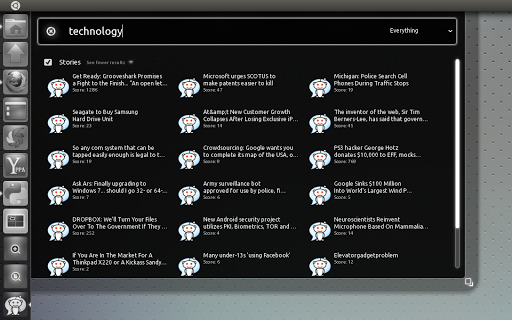
It’s quite hard to combine results from the internet, without using the internet, so your search ends up online. Whilst this is encrypted, the results back are not. This is no worse than a search query with Google or Yahoo or any other search engine, and arguably considerably better as you are not later tracked round the web.
Adding Amazon searches by default
In all the search lenses, Amazon is added by default, this gives Canonical money which is fed back into Ubuntu. This is akin to how Mozilla Firefox set the default search provider to Google.
Mozilla earn over $96 million per year for this. KDE Has similar partnerships with enabling DuckDuckGo searches to be manually activated from krunner for a lot lot less.
It’s not unheard of in open source communities to make money this way, and whilst I don’t think as a user I would like these ads I can’t really hold it against them.
So how bad is it?
Canonical does not have your file contents, they don’t even have a list of your files, nor do they track all key presses.
At best, there is a record of a search term linked to an IP address, which may of may not be part of a file name. It’s not a lot of private data, and it’s not linked to you as a named individual.
The claim by the EFF, is not about the possibility of Canonical ‘spying’ on you. The claim is that a hacker sniffing your network traffic could infer from the from the images returned from Amazon what you are searching for.
Personally I consider this a very weak claim, if someone is sniffing your network traffic your are more likely to give away personal information in other ways, such as any browsing. It’s the EFF’s job to err on the side of extreme caution and to provide information. It’s up to us as the wider community to balance this with pragmatism and to keep things within proportion.

So why is it called spyware by some people?
There is a traditional gap between web and local applications, people ignorant of what the dash search does, mistakenly take this for a simple file search. For a file search to use the web would clearly be wrong. The majority of the complaints and criticisms I have read do not come from Ubuntu users who have seen the Ubuntu bar. To any user of the Ubuntu search bar, it should be obvious that it includes internet results due to the high visibility of the internet results within moments of usage.
If we always try to pander to the notion of treating web and local data as two completely separate distinct entities desktop Linux will always be held behind the web applications that are able to employ much richer content. I don’t want to have to be at a point where Firefox has to provide a prompt to explicitly state that it will use a network connection.
Spies (with the exception of James Bond) are also secretive. The Ubuntu dash makes no effort to hide exactly what it is doing. Whilst it may not be the world’s greatest or most useful feature, this isn’t something that spies.
To call it spyware is a blatant lie, to call it a privacy invasion I think is a massive exaggeration of a rather minor concern that misunderstands the goals of the dash.
KDE Telepathy 0.7.0 Released
Today we are happy to announce a new version of KDE Telepathy, KDE’s instant messaging client.
KDE Telepathy is a suite of applications and plasmoids to allow chatting, file transfer, video calls etc (where available). over popular instant messaging networks. Facebook, Google Talk, Jabber, SIP, and many many more putting all your instant messaging in one place – on your desktop.
Since the Beta
If you have already seen the beta announcement you may as well skip to the end, all the following content is exactly the same. Since the beta we have not added any features but fixed any issues that arose.
It’s been a long time since the beta because KTp has a “we do not release until all major bugs are fixed” policy. Hopefully it will be worth the wait.
Features
New backends support
Instant messaging is a constantly evolving platform. There was a time when everyone important was on AOL instant messaging, now that’s unlikely. This evolving landscape is one of the main reasons for using Telepathy as our backend which is used my multiple clients.
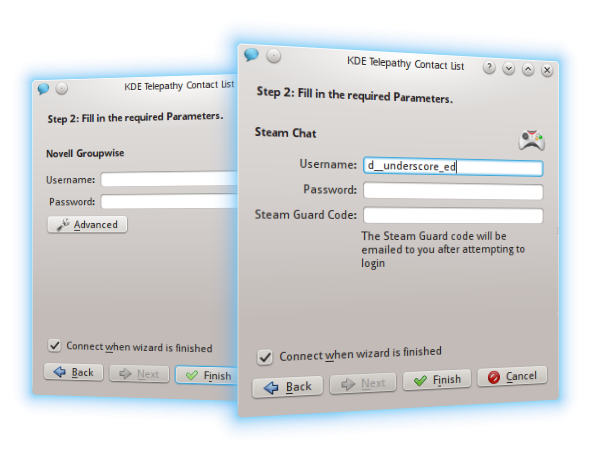
We not only have our own backends, but can support everything provided by libpurple. We’ve looked at some of the up and coming libpurple backends and added the small amount of code to make everything available. In this release we now support setting up Steam and Groupwise accounts, if the relevant libpurple backends are available.
Due to the clever separated architecture of the Telepathy framework, unstable backends do not cause instability in the main application.
In addition we are working on developing our own backends, a GSOC student this summer has developed support for sending SMS messages via ModemManager.
More Text Filtering Plugins
Send LaTeX formula in chats!
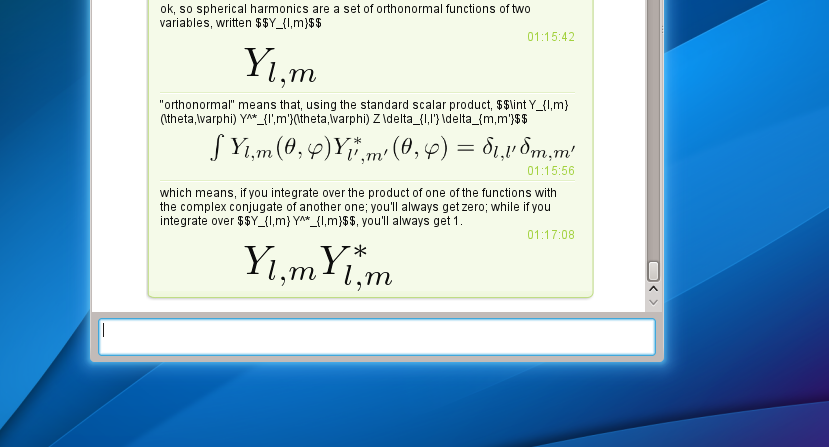
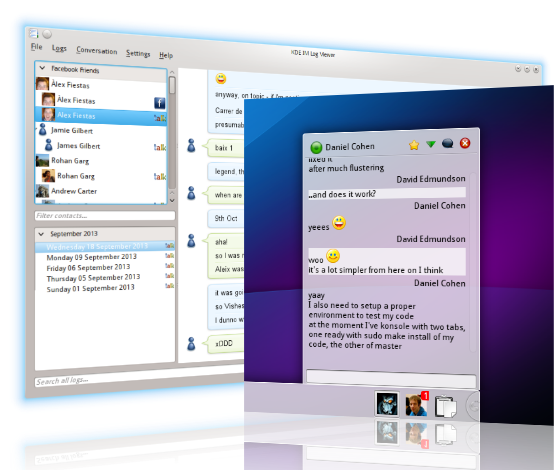
We’ve ported some of our favourite plugins from Kopete, and now we are able to send LaTeX maths formula to each other, great for when you’re stuck on the class assignment.
More Text Filtering Plugins
Send LaTeX formula in chats!
We’ve ported some of our favourite plugins from Kopete, and now we are able to send LaTeX maths formula to each other, great for when you’re stuck on the class assignment.
Collaborative Editing
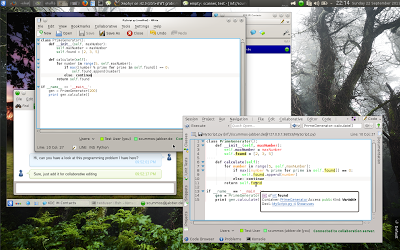
As a Google Summer of Code project, collaborative text editing was added to kde-telepathy. Most prominently, there’s now a “Collaboratively edit a document” button in the chat window, which allows you to edit a document together with a contact without any setup being required (except for you and your contact installing the application, of course). Instead of introducing a new dedicated collaborative editor, this feature integrates with existing KDE applications, such as Kate or KDevelop.
This works by using a technology called Telepathy Tubes, which defines a way to use Jabber to open a TCP connection to a contact in the best most efficient way possible. In most cases, it should use a proxy server, but if a direct connection without a proxy is possible, it will prefer that. If even the proxy does not work, it can also fall back to transferring data directly over the Jabber server, which is a bit slower, but works for every environment.
Documentation on how to use and install this feature is available here. A more in-depth announcement of the current release is here.
Contact Aggregation
The advantage of using a multi protocol instant messaging client is we are able to show all your accounts in once place. However, this can lead to multiple entries for the same contact across different services.
We are now able to join multiple contacts together, we’ve introduced a user-interface that allows you to choose to ignore the technical details and start chats quickly or provide fine-grained control as required.
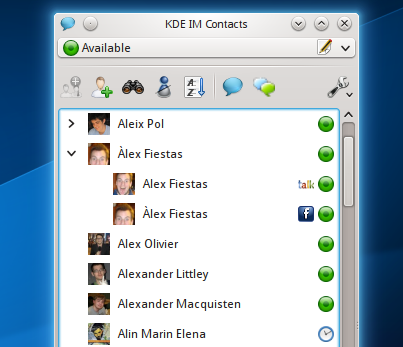
We provide this by adding support for libkpeople – a new system-wide KDE metacontact library aggregating information from all contact sources not just instant messaging contacts but also your local address books, Facebook Feeders, Google contacts, LDAP servers and anything else that provides contacts.
Libkpeople works by syncing contact data from all sources into Nepomuk, this means that in addition to grouping instant messaging contacts together we can also interact with data from other sources. We can see email addresses, phone numbers addresses and start a range of actions.
As this includes both a Nepomuk dependency and a new library we’ve opted for having two modes, one with the additional features and the other without. If you don’t run Nepomuk you will still have original contact list working as before.
In this release we are only adding small subset of new features KPeople is going to provide as it is still very much a work in progress. We wanted to ship this now, to give basic metacontact support setting the buildling blocks for the more advanced features.
Note as this is a new library, your distribution may or may not have this supported.
Fixes Galore
In addition to all the new features we have been working on fixing lots of additional papercuts throughout the rest of KDE Telepathy.
There have been over 1000 commits since 0.6 and over 300 bugs resolved.
Getting The 0.7 Release
KTp 0.7.0 is available at http://download.kde.org/unstable/kde-telepathy/0.7.0/; packages should be available in some of the major distributions shortly.
If you encounter any problems with the release, please file bugs on our bug tracker
Getting Involved
As always we need new developers, we have a lot of exciting new features planned for 0.8.
You can find out more about getting involved here on our wiki
.
KTp Facebook Instant Messaging Problems
Many of you in recent weeks have probably faced problems with Facebook XMPP’s server. They are migrating to new servers which have had their share of problems, causing KDE Telepathy clients to display the following:
Not everyone is affected at the same time due to a gradual roll out by Facebook.

Fixing this problem
This particular problem is caused by a non RFC compliance in Facebooks XMPP service.
I don’t mean to blame the Facebook developers here, everyone makes mistakes, especially when dealing with XMPP 🙂
In this particular case they are missing a parameter which, whilst required by the specification, is not practically needed. Our library then assumes something is wrong and quits.
Thanks to help from users at http://forum.kde.org I was able to reproduce the problem.
I have added a workaround in the Telepathy Gabble backend to resolve this issue which should fix KTp, Empathy, and other Telepathy users (including the Nokia N9 if they were to make a new release). Other upstream developers helped spring into action to clarify RFCs, add regression tests and backport into 3 different stable releases.
It really highlights the importance and advantages of sharing backends.
Moving forwards
In order to prevent problems like this in the future I am now a member of the Facebook XMPP developer relations group. In addition I now connect to a beta version of the Facebook Chat gateway so we can spot and communicate errors faster.
Summary
Upgrade telepathy gabble to the latest version (0.18.1) and this problem should go away. Backports are coming soon.
Season of KDE 2013 Applications Open
Season of KDE is now officially open for applications.
To apply head to http://season.kde.org register as a student and click “Submit a proposal”
What is Season of KDE?
Season of KDE is a community outreach program, much like Google Summer of Code that has been hosted by the KDE community for five years straight.
It is meant for people who could not get into Google Summer of Code for various reasons, or people who simply prefer a differently structured, somewhat less constrained program. Season of KDE is managed by the same team of admins and mentors that take care of Google Summer of Code and Google Code-in matters for KDE, with the same level of quality and care.
Who can take part?
Everyone can apply for Season of KDE. We give preference to those who have applied for Google Summer of Code and to students, but we will gladly consider applications from anyone.
What do I get out of this?
A great summer working on a really cool KDE project and gaining valuable experience. If you complete your project successfully you also get a T-shirt, a certificate, and maybe a few other goodies.
What is the timeline?
Season of KDE is a flexible project to fit around school terms, work, and other commitments, and start and end dates can be discussed with your mentor. Projects should be completed before the end the year, a typical Season of KDE project should take around 2 months.
How do I apply?
First get in touch with a mentor about your ideas, and what projects they want to run.
Then head to http://season.kde.org and follow the instructions.
Do I need to have a mentor before applying?
It is preferred. Ideally, you should contact a KDE subproject well before applying, ask for feedback on your idea if you have one, and request a mentor directly. A list of KDE subproject contacts is available on the Google Summer of Code 2013 ideas page. You can also apply without a mentor and we will try to find one for you.
Do I need to have a project idea before applying?
It is preferred. If you do not have one we will try to find one for you. Keep in mind that the KDE community is pretty big, so you should at least have an idea of which KDE subproject you wish to work on.
Do I need to write a proposal like in Google Summer of Code?
No, but we would like to see a brief project plan describing what you will be working on.
Is it only for coders like Google Summer of Code?
We are willing to consider non-coding projects as well including artwork and promotion, but you should definitely get in touch to figure out the details beforehand. The KDE Community Wiki describes ways to get involved with KDE that do not require coding.
I applied for a project in Google Summer of Code but another student got selected for it. Can I still work on it?
Maybe, but likely not. You should ask the mentor that was assigned to your idea. We can try to find something related for you if you want, or something completely different. Let us know what you wish and we will do our best to accommodate your request.
Is this an extension of Google Summer of Code or connected to Google?
No. While Season of KDE is in many ways modeled after Google Summer of Code and administered by the same members of the KDE community, it is completely independent from Google Summer of Code and has no connection to Google whatsoever.